
Reviews
Mirror Pattern Creator succeeds by stripping away everything unnecessary. There are no tutorials, no levels, no pressure—just a blank canvas and the immediate reward of seeing your movements transformed into balanced, colorful designs. The instant feedback is deeply satisfying, and the ability to adjust symmetry and color keeps each session fresh. It is an ideal tool for anyone seeking a calm, focused creative activity that requires no prior artistic skill. The local save feature adds practical value, letting you build a portfolio of patterns over time. A genuinely relaxing experience.
Description
Instant Symmetry Generation
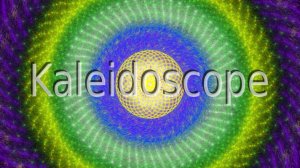
At the heart of Mirror Pattern Creator lies a simple but powerful mechanic: every line drawn on the canvas is mirrored automatically to create a complete, balanced design. This real-time feedback loop means that even a single curved stroke can blossom into an intricate mandala or a flowing geometric composition. The tool eliminates the complexity of traditional graphic software, allowing users to focus purely on the joy of making shapes and colors interact.
Controls Designed for Exploration
Interaction is handled entirely through mouse movements and keyboard shortcuts. Drawing is as natural as using a pen, with the mouse determining both the path and the speed of each stroke. Faster movements produce thinner, more energetic lines, while slow, deliberate motions yield thicker, more deliberate shapes. A set of intuitive keyboard commands lets users cycle through color palettes, adjust the number of symmetry axes, or reset the canvas to begin a new piece. This streamlined control scheme ensures that the learning curve is nearly flat, inviting users of all ages to start creating immediately.
Building a Personal Gallery
Mirror Pattern Creator includes a local save and load system that allows users to store their work directly on their device. This feature is particularly useful for those who want to revisit a design later, refine it, or build a collection of patterns over time. The save function captures the entire canvas state, so returning to a project feels seamless. There are no cloud accounts or online galleries to manage, which keeps the experience private and focused on personal enjoyment.
Creative Mindset and Approach
The tool is built around the idea of process over product. There are no scores, timers, or competitive elements. Instead, the environment encourages a meditative state where the act of creating is its own reward. Users are free to experiment with different symmetry settings, color combinations, and drawing techniques without fear of failure. This makes Mirror Pattern Creator an excellent choice for stress relief, mindfulness practice, or simply a quiet creative outlet. The only goal is to enjoy the unfolding patterns and the calm they bring.
✅ Compatibility & Testing
Faq
Related Games
Snake Journey: Endless Puzzle Adventure
Dot Tap: Color Match Puzzle

Dog Jigsaw Puzzle Game
Flow Connect Logic Puzzle
Sticka Stacka Tile Puzzle

Labyrinth Quest: Arcade Adventure

Sheep Farm Helper: Family Puzzle Adventure

Diamond Gem Puzzle

Fox Gem Trail Puzzle

Player Comments
Sign in to comment
You must be logged in before posting a review or rating.
No account? Create one
No comments yet. Be the first to comment!