
Reviews
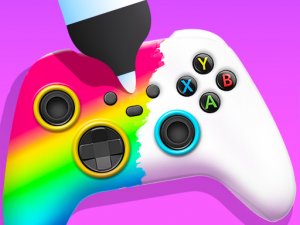
Joystick Art Designer Game offers a stress-free creative outlet. The simple tools and wide range of colors and stickers make it easy to create unique designs. It is perfect for children and adults who enjoy artistic activities. The lack of time pressure allows for thoughtful experimentation.
Description
Game Introduction
Joystick Art Designer Game invites players to become creative artists who transform ordinary joysticks into colorful works of art. In this game, customers bring their plain or worn joysticks, and players use a sprayer tool, vibrant colors, smart stickers, and creative methods to design them. Players can follow customer requests or follow their own imagination. The game is colorful, cheerful, and family-friendly, encouraging artistic expression without any complex rules. It offers a relaxing and positive environment where creativity is the main focus. The core objective is to take a simple joystick and turn it into something visually appealing and unique. What makes this game special is its emphasis on freeform design and personal expression, allowing players to experiment with different combinations of colors and decorations. There is no pressure to perform or compete, making it an ideal choice for players who enjoy art and design activities. The game is suitable for all ages and promotes a sense of accomplishment as players see their creations come to life.
How to Play
To play, start by choosing a joystick to work on. Players typically pick up the sprayer tool and apply bright colors to the joystick surface. Then they add stickers and decorations to match the customer's style or their own vision. Simple on-screen instructions guide players to mix and match elements. The process involves experimenting with different color and sticker combinations to create unique designs. The gameplay is intuitive and lets players see their creation come to life step by step. There are no complex controls or time limits, so players can enjoy the creative process at their own pace. The game encourages trying out various tools and seeing what works best for each design.
Game Features
Creative joystick design with a variety of colors and stickers. Simple tools that are easy to use for all ages. Endless possibilities to mix and match elements. No time pressure, so players can enjoy the creative process at their own pace. Family-friendly content that is safe and positive for everyone. The game may include multiple joystick shapes and styles to work on, allowing for diverse design projects. Players can experiment with layering stickers to create depth and unique effects. The focus is on artistic expression and fun, without any competitive elements.
Tips for Success
Take your time to explore all available colors and stickers before starting a design. Pay attention to customer preferences if you want to match their requests. Try combining unexpected colors and patterns for more unique results. Experiment with layering stickers to create depth. The more you practice, the better your designs will become. Enjoy the process and let your imagination guide you.
Compatibility
Faq
Related Games

Cookie Mystery Puzzle Adventure
Snake Journey: Endless Puzzle Adventure
Find the Cat: Cozy Hide-and-Seek Puzzle
Find the Hidden Objects Puzzle
Ladders and Slides Family Board Game
Bunny Pairs Puzzle
Flow Connect Logic Puzzle
Draw Path Puzzle Quest
Sheep Farm Helper: Family Puzzle Adventure
Player Comments
Sign in to comment
You must be logged in before posting a review or rating.
No account? Create one
No comments yet. Be the first to comment!